
Zephire Release Highlights: New Report + Payment Allocation Enhancements
Zephire recently released new enhancements to the platform. Below is a summary of the updates included in this release.
New Report: Open Balances by Charge Type
We’ve created a new report that lists open account balances by charge type. This report can be viewed within:
Reports → Location Reports → Financial tab → “Balances by Charge Type”

Short Payment and Prepayment Logic Updates
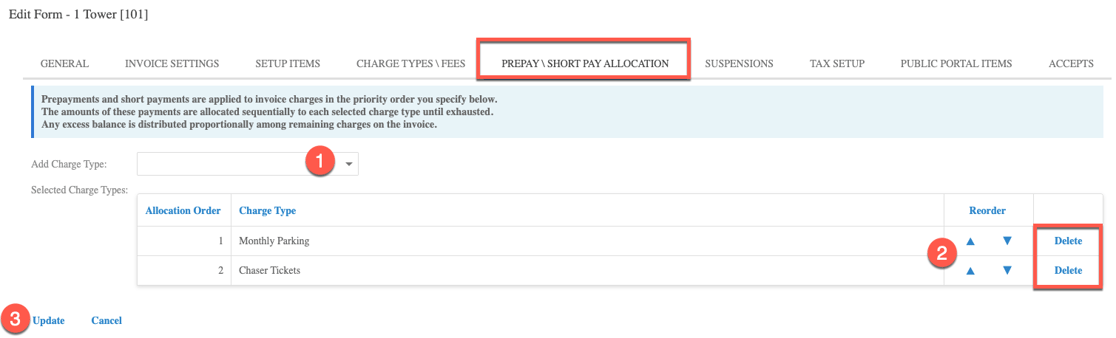
We’ve added a new tab within the Location Settings menu records called Prepay / Short Pay Allocation. This tab allows you to dictate the charge type order you want short pays and prepayments to be applied in.
How to configure allocation
Navigate to the Prepay / Short Pay Allocation tab within the location settings record.
Select the charge type(s) from the drop-down list.
Use the arrows to the right-hand side of the charge type to determine the order in which you would like these paid.
Save your changes.
To remove a charge type, click Delete.
How allocation is applied
If there are charge types included on an invoice whose allocation has been determined and additional charge types whose allocation has not been determined, the system will first allocate the payment to the selected charge types within the Prepay / Short Pay Allocation tab, and then will distribute the remaining payment among the remaining charge types (if applicable).
If there is no preference as to which charge types are paid first via a short payment or prepayment, you can leave this menu blank.
Group Portal: Autogenerate Charges
Similar to the Admin Portal, when new parkers are added to a group account through the Group Portal, pending charges are created for this parker.
Admin Portal: Group Parker Address Fields Added
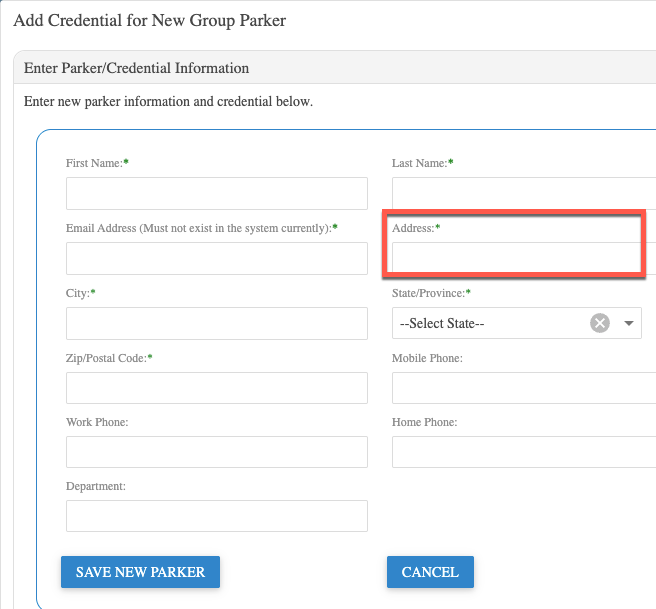
Previously, the Address field was not available when adding a new parker through the Admin Portal within the group accounts menu or group contracts menu. This has now been added, as it is required for some PARCS system integrations.
Integrations
We’ve added new integrations with SpotHero and Park Loyalty. If you’re interested in integrating with Zephire, please reach out to our team for additional details.
Bug Fixes and User Manual
For a list of bug fixes included in this release, please click here.
Need additional information on how to use Zephire? Access the system user manual within Zephire.
If you’d like help enabling any of these features—or want a walkthrough of the new report and allocation settings—reach out to your Zephire contact or our support team.